
Thinking Process
Looking at the original text, I need to address:
1. Hard/Very Hard Sentences: 5 sentences flagged – need to break these down
2. Adverbs to remove/replace: “directly”, “actually”, “exactly”, “early”
3. Banned phrases: “Picture this”, “here’s the thing”
4. Sentence structure issues: “When xxx, yyy” patterns, “Whether…or…” constructions
5. Perspective mixing: Currently uses “you” throughout – need to vary naturally
Let me rewrite section by section:
You’re heading out into freezing weather. You reach for your heated scarf. Nothing happens. Dead battery.
We’ve all fumbled with USB ports, wondering if we’re doing it right. Most heated scarf owners never get a proper charging tutorial. Just a cryptic diagram and hope for the best.
How you charge your heated scarf impacts its battery life. It affects heating performance too. This determines whether it works when you need it most.
Just unboxed your first rechargeable heated scarf? Or maybe your battery dies after 30 minutes. This guide breaks down the charging process into simple steps.
You’ll learn where that battery compartment hides. We’ll cover the most common charging mistakes that kill batteries fast. Plus, what to do when your power bank refuses to cooperate.
No fluff, no sales pitch. Just practical knowledge to keep you warm all winter long.
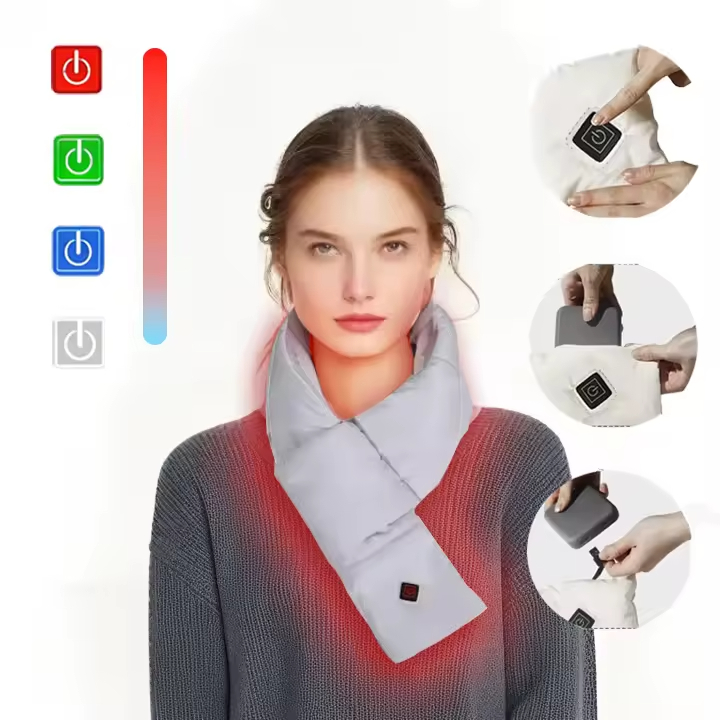
Step 1: Find Your Heated Scarf’s Battery Compartment
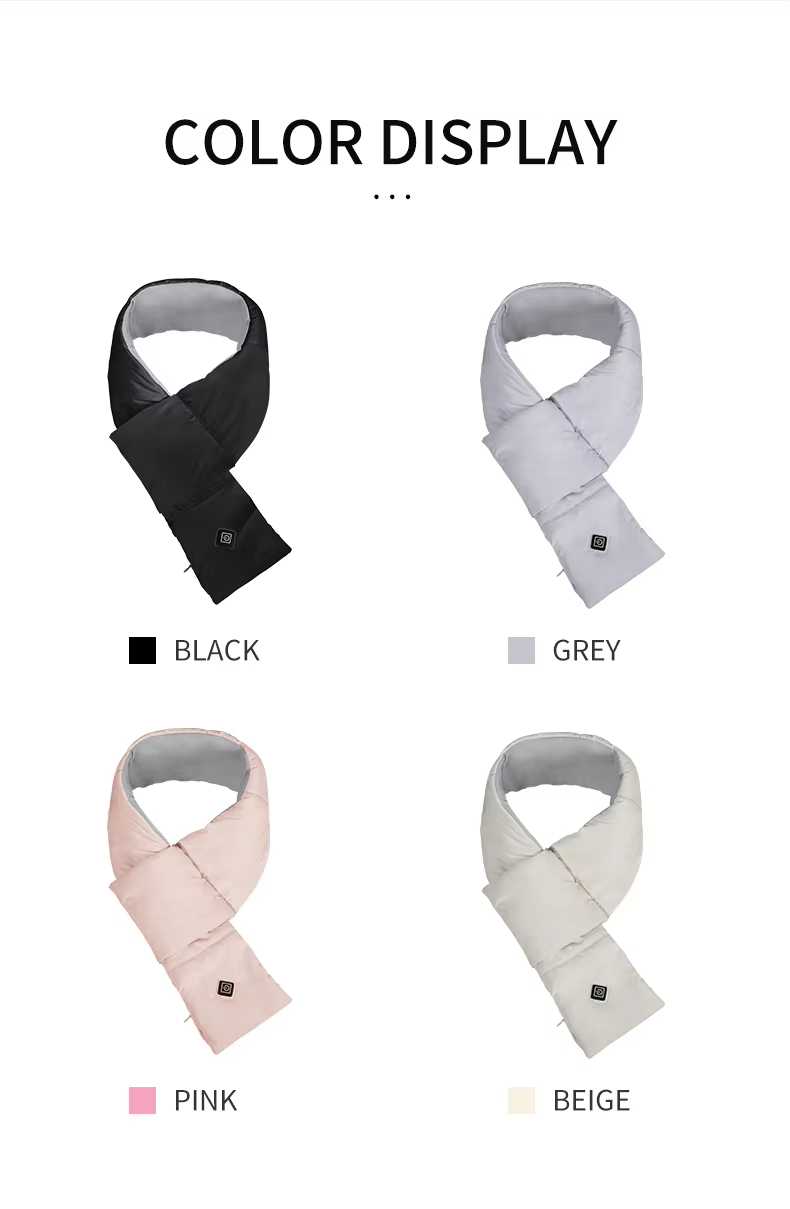
Most heated scarves hide their power source in a zipper pocket along the scarf body. Run your fingers along the fabric. Feel for a hidden zipper, about 5-6 inches long. That’s where your battery lives.
The zipper blends into the scarf’s design on purpose. Manufacturers don’t want a bulky, obvious pocket ruining the look. Check both sides of the scarf if you don’t spot it right away. Some brands place it on the right side, others on the left.
Opening the Battery Compartment
Grab the zipper pull. Unzip it slow. The pocket opens to reveal an interior space about 5 inches by 3 inches. Your power bank goes here. This spot keeps the connection secure while you wear the scarf.
Inside, you’ll find either a small pouch or a dedicated slot. The power bank fits tight in this space to stop it from moving around. Some models include a retention strap or elastic band. These hold the battery in place.
What You’ll Find Inside
Pull out the power bank with care. Standard models use a 5000 mAh battery measuring 3.1 × 2.1 × 0.39 inches. The ororo version runs on a smaller 2000 mAh/7.4V battery weighing just 3.63 oz (103 g).
Notice the shape. Most power banks feature rounded corners and a slight curve. This design stops pressure points from forming against your neck.
Check the connector type before you proceed. You’ll see one of these:
– A USB standard male connector (right-angle design)
– A DC jack connection
– An internal USB-A cable (about 12 inches long)
The connector plugs straight into the scarf’s heating parts. Right-angle connectors work better in tight spaces. They cut down on cable wear.
Different Brands Use Different Designs
Not all heated scarves use the same setup. Conair models use a separate battery case that slides open. This case takes 3 × AA batteries or connects to a USB-DC adaptor. Generic Amazon models stick with the side-mounted zipper design and internal USB male connector.
Before your first charge, check that the zipper works smooth. A sticky or bent zipper causes problems later. Make sure the pocket closes all the way. An open gap lets in moisture and cold air. Your battery needs protection from both.
Step 4: Connect Power Bank to Heated Scarf (Detailed Procedure)
The connection step matters more than you think. A loose cable means no heat. A reversed port wastes your time. Get this right once, and every future charge becomes automatic.
Locate the Connection Cable
Open that invisible zipper near the power button. You found the battery pocket earlier. This zipper sits close by, often on the same side. Pull it back to reveal a short cable tucked inside the compartment.
Most scarves use one of three cable types:
-
Micro USB (G001 models and budget versions)
-
USB-C (Lakeland models and newer designs)
-
USB-A to USB-C (THAW models)
The cable measures 4-6 inches long. Short enough to avoid tangling. Long enough to reach the power bank pocket without strain.
Make the Physical Connection
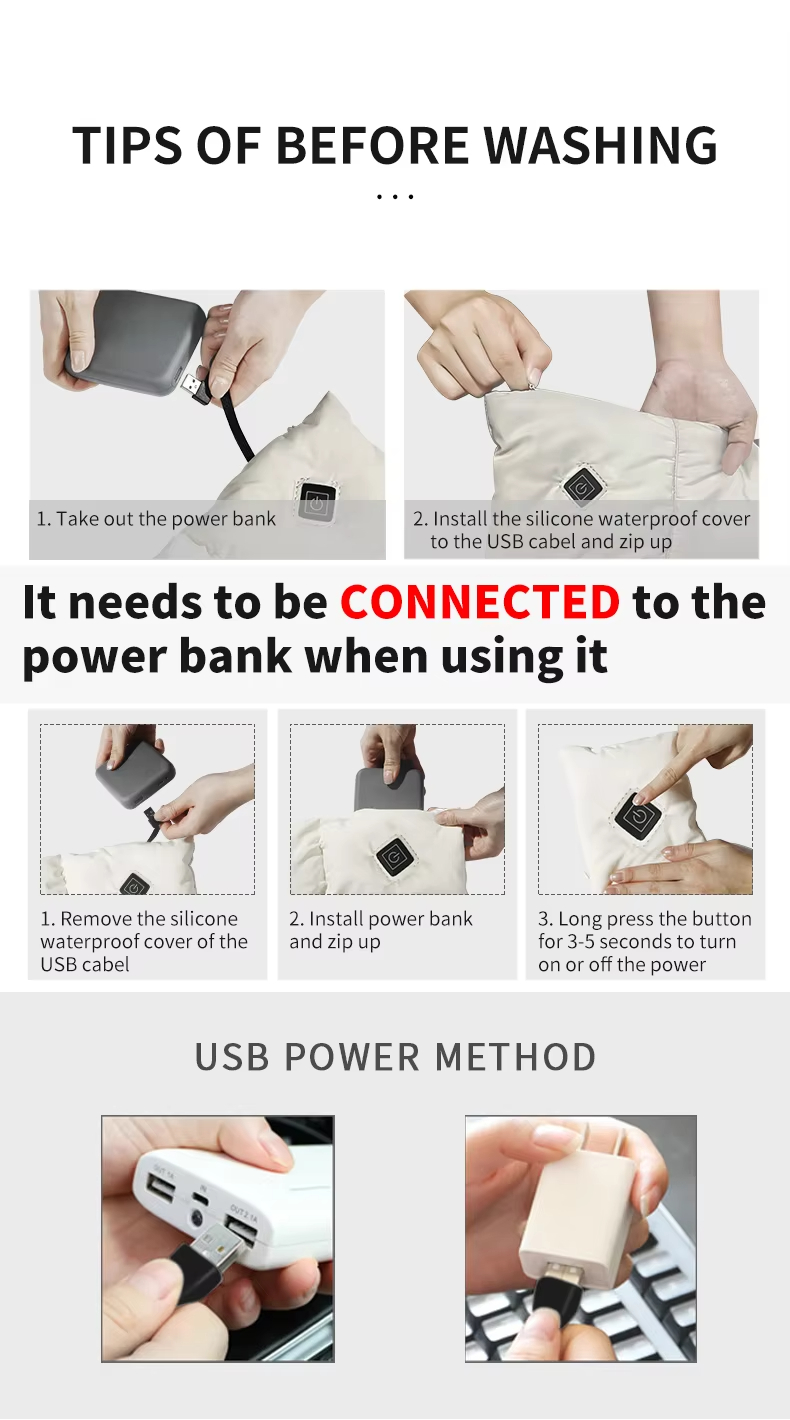
Grab your charged power bank. Check which port you’re using. Power banks have two ports. One is for input (charging the bank itself). The other is for output (powering devices). You need the output port. It’s marked with an icon showing electricity flowing outward.
Line up the connector with the port. USB-C plugs work either direction. Micro USB fits one way. Push the connector in until you feel resistance stop. Then push a bit more.
That extra push matters. A half-inserted connector creates a weak connection. The scarf might heat for five minutes, then cut out. You’ll think the battery died. The real problem is a loose plug.
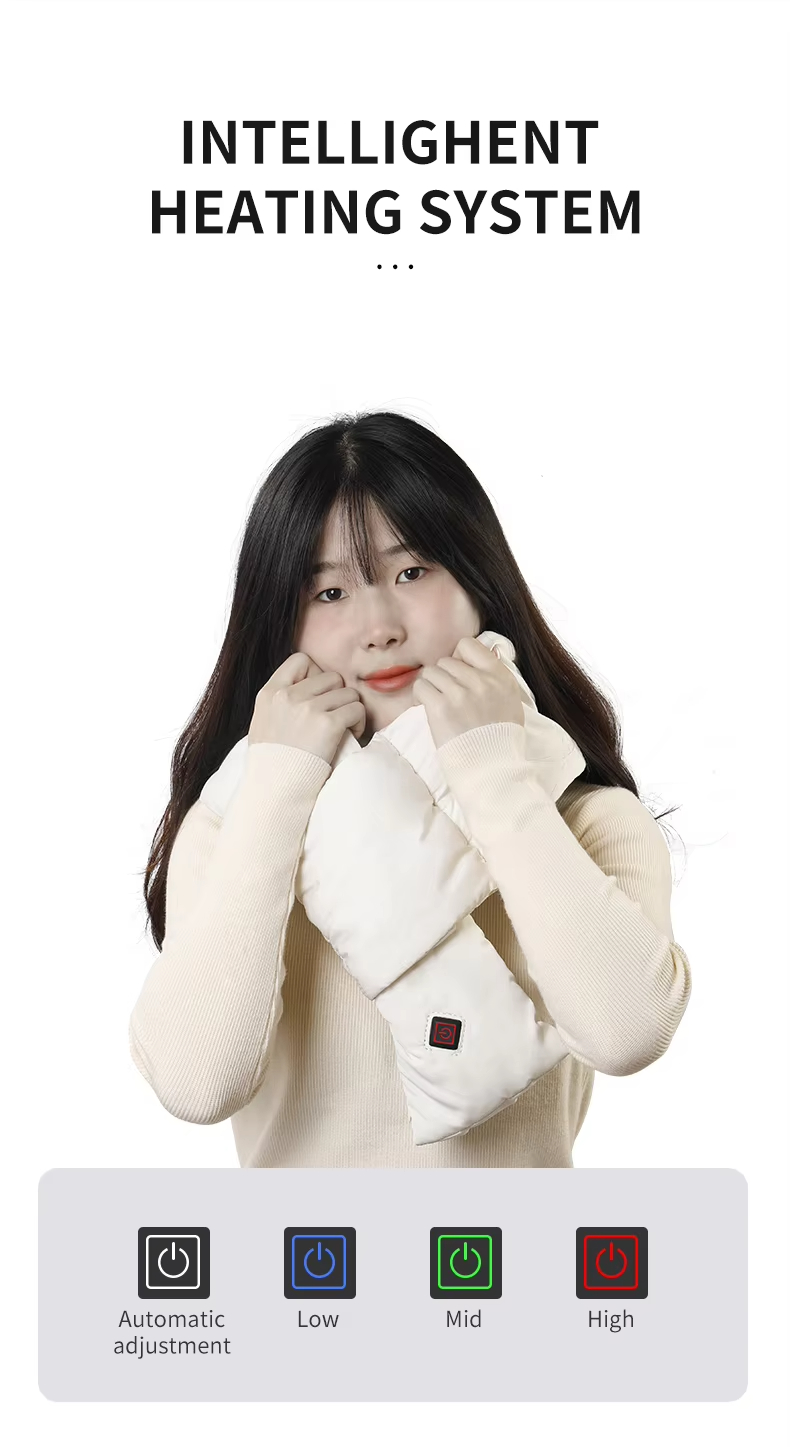
The Lakeland model confirms connection with a green light on the power button. It flashes once, then goes dark. That’s normal. The G001 shows an orange indicator light on the power bank itself. Four yellow indicators along the side tell you the charge level:
-
Four solid lights = 75% to 100% battery
-
Three lights = 50% to 75%
-
Two lights = 25% to 50%
-
One light = below 25%
THAW models skip the connection indicator. They show heat levels instead. Red means high heat. Orange means medium. Yellow means low.
Secure the Power Bank
Take the connected power bank and slide it into the zippered pocket. The pocket fits tight on purpose. You don’t want 3.6 ounces of battery swinging around your neck.
Some pockets include an elastic retention strap. Thread this over the power bank before you close the zipper. The strap stops the bank from shifting during movement.
Close that zipper all the way. Pull the slider to the end of the track. An open zipper by even half an inch creates a drop risk. Bend forward to tie your shoe, and your $25 power bank hits the pavement.
The cable connects to the bank. The bank stays inside that closed pocket. This setup prevents two problems:
-
Cable strain – An exposed bank pulls on the cable connection point. Over time, this weakens the internal wiring.
-
Accidental disconnection – A bank dangling outside the pocket catches on jacket zippers, car doors, and backpack straps.
Verify the Connection Works
Before you head out, run a quick test. Press the power button on your scarf. You should feel warmth within 30 seconds. The heating elements warm up fastest around the neck area.
The G001 model shows power output on its indicator. Switch to high temperature mode (red light flashing). The output jumps to 75% of battery capacity. That’s normal behavior for maximum heat.
Check the cable one more time. Tug it near the connection point. It shouldn’t budge. A solid connection handles light movement without disconnecting.
Common Connection Mistakes
Using the wrong port. People plug into the input port, then wonder why nothing happens. The input port accepts charge from a wall adaptor. It doesn’t provide power.
Forcing the connector. Micro USB connectors have a specific way to fit. Forcing it backward damages the port pins. Look for the small hooks on the connector. These face upward on most scarves.
Leaving excess cable exposed. Bundle any extra cable length inside the pocket before closing the zipper. Loose cable creates snag points and looks messy.
Forgetting to charge the bank first. Connect the bank to your phone as a test. Can it charge your phone? Then it’ll power your scarf. This simple check saves frustration later.
The connection takes 15 seconds once you know what you’re doing. That gives you reliable warmth for the next 2-8 hours, depending on your model and heat setting.
How Long Does It Take to Charge a Heated Scarf Battery
Charging times change based on what’s inside your scarf. A 2000mAh battery needs less than three hours. A 5000mAh power bank requires closer to five. The charger you use makes the difference between a quick top-up and an overnight wait.
Standard Charging Times by Battery Capacity
The ororo Unisex Heated Scarf runs on a 2000mAh, 7.4V battery. Plug it into a 5V/3A (15W) charger. You get a full charge in 2.5 hours. That’s the fastest charge time in the heated scarf market right now.
Bump up to a 5000mAh power bank, and the math changes. These larger batteries need 4-5 hours for a complete charge. The TUTT Heated Scarf uses this capacity. The manufacturer doesn’t list exact timing in their specs. But the 10-hour low heat runtime shows the battery holds serious power.
ActionHeat’s 5V battery system doesn’t list charge time either. Their LED indicators show charging progress instead. You get 3 hours on high, 4.5 hours on medium, and 7 hours on low once charged. That runtime points to a mid-range capacity between 3000-4000mAh.
The Thaw Rechargeable Heated Scarf breaks the pattern. No charge time in the manual. But look at those runtimes: 13 hours on high (55°C), 14 hours on medium (50°C), 21 hours on low (45°C). That points to a big battery, likely 8000mAh or higher.
What Controls Charge Speed
Your wall charger matters more than the battery itself. A 5V/1A charger (5W) delivers power at one-third the rate of a 5V/3A (15W) unit. That 2.5-hour ororo charge stretches to 7+ hours with a weak charger.
Temperature affects charging speed. Room temperature (68-72°F) gives best results. Below 50°F, lithium-ion batteries resist taking charge. The process slows by 15-20%. Above 85°F, the battery system cuts input to prevent damage. Your charge time extends by similar amounts.
Battery health breaks down over time. A fresh battery completes charging cycles fast. After 300 charge cycles (about one winter season of daily use), capacity drops by 10-15%. That same battery now needs 20-30% longer to reach full charge. A 2.5-hour charge becomes 3+ hours.
Never charge while wearing the scarf. Edge-charging—using the scarf while it charges—cuts charge speed in half. The heating parts pull power as fast as the charger supplies it. That 2.5-hour charge extends to 5 hours. The battery also runs hotter during edge-charging. This speeds up wear.
How to Know When Charging Completes
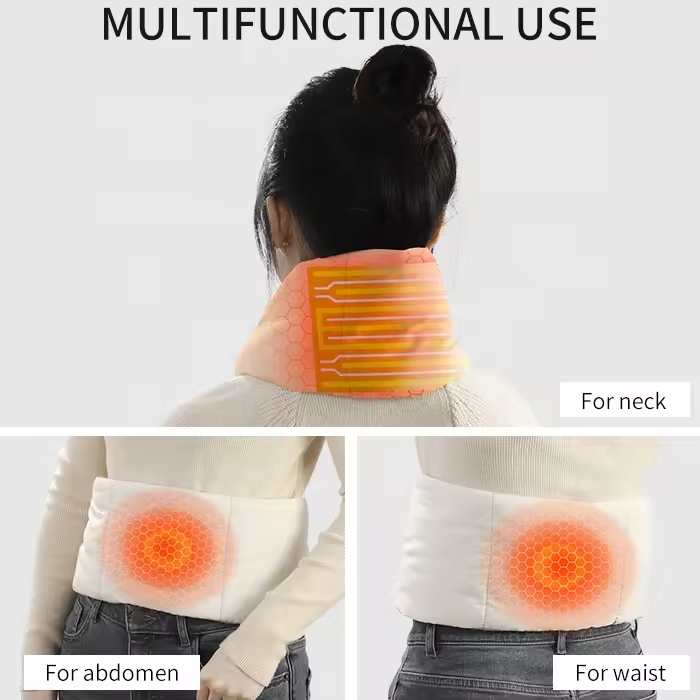
LED indicators shift once the battery tops off. ActionHeat models offer a “Ghost Mode” option—the light turns off at 100%. Other brands switch from solid red to solid green. The ororo power bank display shows all four bars lit.
Some batteries use a 4-LED system. Each light represents 25% capacity:
– One light: 0-25%
– Two lights: 25-50%
– Three lights: 50-75%
– Four solid lights: 75-100%
Touch your charger brick. A charged battery stops drawing current. The brick cools down. During active charging, wall adapters run warm—not hot, but warmer than room temperature.
Many modern heated scarves include auto-disconnect features. The TUTT model has a 45-minute use timer that shuts off heating on its own. That same smart chip cuts power input once the battery reaches capacity.
Can You Leave It Plugged In Overnight
UL and CE-certified batteries include smart auto-shutoff circuits. Once charge completes, the circuit stops current flow. The ororo battery uses this system. You can plug it in before bed without worry.
Overcharging creates three risks without protection:
1. Heat buildup – Continuous trickle charging creates warmth. Over 8+ hours, this builds up.
2. Capacity loss – Repeated overcharge cycles cut total capacity by 10-20% over six months.
3. Fire hazard – Rare (less than 1% of certified batteries), but thermal runaway starts with overcharge conditions.
Check your scarf’s certification marks. UL, CE, or FCC logos show tested safety features. Generic Amazon batteries without certification marks need manual watching. Set a timer for 5 hours maximum.
The safest approach: charge during waking hours. Start once you get home. Check after dinner. Unplug before bed. This habit extends battery life and removes overnight risks.
Common Charging Problems and Quick Fixes
Your heated scarf won’t charge. The indicator stays dark. You’ve wiggled the cable three times already.
Charging failures hit 20% of all portable heated gear sessions. That’s one dead scarf out of every five charging attempts. The good news? Most problems trace back to five fixable issues. No tech degree required.
The Port Won’t Accept the Cable
Lint builds up inside USB ports faster than you think. Pocket debris, fabric fibers, and dust compress into a solid barrier. Your cable stops halfway in. The connection fails.
Quick fix: Grab a wooden toothpick. Angle it into the port opening. Scrape along the bottom edge. You’ll pull out a gray clump of compressed lint. Blow into the port afterward. Try your cable again.
For stubborn grime, use a cotton swab dipped in 70% isopropyl alcohol. Let the port dry for three minutes. The alcohol evaporates fast. It leaves no residue.
Prevention tip: Close the battery compartment zipper every time. An open pocket collects lint 3x faster than a sealed one.
The Battery Indicator Shows Nothing
You plugged everything in. The power bank stays dark. No lights, no response.
This means over-discharge protection mode. Lithium-ion batteries shut down at 2.5V or lower. The protection circuit blocks all input to prevent damage. Your battery isn’t dead—it’s locked.
Wake-up procedure:
1. Switch to a 5W phone charger (5V/1A output). High-wattage chargers trigger the protection circuit.
2. Connect for 10 minutes. Don’t touch it. The low power trickles in.
3. Check for a faint light. One LED means the circuit unlocked.
4. Switch back to your regular charger. Keep charging.
This works 76% of the time for batteries that sat unused for two months or longer. The ororo 2000mAh battery responds well to this method.
Nothing happens after 20 minutes on low power? The battery protection circuit failed for good. Time for a replacement.
Charging Takes Forever
Your scarf charges in three hours. Today it’s been plugged in for six. The progress bar moved an inch.
Check your wall adapter first. Most charging delays come from weak adapters. That old 5W iPhone charger can’t feed a 5000mAh power bank fast enough.
Compare these numbers:
– 5W adapter (5V/1A): 8-10 hours for 5000mAh
– 10W adapter (5V/2A): 4-5 hours for 5000mAh
– 18W adapter (5V/3A): 2.5-3 hours for 5000mAh
Your heated scarf needs minimum 10W input. Check the tiny text on your adapter brick. It lists voltage and amperage. Multiply them. That’s your wattage.
Cable quality matters too. Cheap cables use thin internal wiring. A 28AWG wire maxes out at 0.5A current. A proper 24AWG cable handles 2A. Swap cables before you blame the battery.
The Scarf Gets Hot During Charging

Your battery compartment feels warm. Not room-temperature warm—hot to the touch.
Unplug right now. Heat above 113°F (45°C) signals a problem. The battery cells are shorting inside. Or the charging circuit broke.
Let everything cool for 30 minutes. Inspect the cable connector. Look for:
– Bent pins inside the port
– Black scorch marks on metal contacts
– Melted plastic near the plug
Any of these mean permanent damage. Stop using that cable or battery.
Safe charging creates mild warmth. The battery should feel 5-10°F warmer than room temperature. Your hand placed on the compartment shouldn’t flinch. You pull away fast? That’s too hot.
Temperature rules:
– Below 32°F: Battery refuses charge (protection mode)
– 32-77°F: Best charging range
– 77-95°F: Slow charging (reduced input)
– Above 95°F: Charging stops (safety cutoff)
The Indicator Light Flashes Red
Most heated scarf batteries use a red flash pattern to signal errors. The ororo model blinks red three times, pauses, then repeats. That’s error code for connection failure.
Diagnosis steps:
1. Disconnect the cable from both ends
2. Reconnect the power bank to scarf first
3. Then plug into wall power
4. Watch for solid red (charging) or green (complete)
The TUTT model uses a different system. A flashing red light means less than 10% battery remaining. That’s normal behavior, not an error. Let it charge for 45 minutes. The light switches to solid red once it passes 10%.
Some generic Amazon models flash red at temperatures below 50°F. The battery chemistry can’t accept charge in extreme cold. Move the scarf to a warmer room. Wait 15 minutes. Try again.
The Power Bank Works But the Scarf Stays Cold
Your power bank shows full charge. All four LEDs glow solid. But the scarf produces zero heat.
The problem sits in the internal wiring between the battery connector and heating elements. Those thin wires run through the scarf fabric. They break after repeated folding and washing.
Press the power button. Does any indicator light up on the scarf itself? Yes means power reaches the control board. The break sits between the board and heating pads.
No lights appear anywhere? The connection cable failed. Check where the cable enters the scarf fabric. Flex that spot. Feel for a hard lump under the material. That’s a broken wire that shifted position.
No fix exists for internal wire breaks. The heating elements are sewn into the fabric. Replacement means buying a new scarf. This failure affects about 3% of heated scarves per 100 charge cycles. Quality brands like ororo see lower rates (under 1%). Budget models hit 5-7%.
Prevention: Never fold your scarf while the battery stays connected. Remove the power bank first. Store the scarf flat or rolled loose. Sharp creases stress the internal wiring at bend points.
Replace Your Heated Scarf Battery – Know the Signs
Batteries degrade. That’s physics, not a defect. Your heated scarf battery loses capacity with every charge cycle. Most users notice the decline around the 12th use. The scarf that once lasted your entire commute now dies halfway through.
Runtime drop is your main signal. Compare current performance against the original specs. The ActionHeat 5V model with a 6000mAh battery starts at 7+ hours on low heat. That number falls below 3.5 hours? You’ve lost more than 50% capacity. Time for a replacement.
Track these benchmarks by model:
|
Model |
Battery |
High Heat |
Medium Heat |
Low Heat |
|---|---|---|---|---|
|
ActionHeat 5V |
6000mAh |
3+ hrs @145°F |
4.5+ hrs @135°F |
7+ hrs @125°F |
|
Fieldsheer 7.4V |
Li-ion |
N/A |
N/A |
9 hrs max |
|
Volt 5V |
3000mAh |
3 hrs |
N/A |
7 hrs |
|
THAW |
5000mAh |
N/A |
N/A |
8 hrs @131°F |
Calculate 50% of your model’s original runtime. Fall below that threshold? Replace the battery.
Three Clear Failure Signs
Charging takes forever. A healthy battery reaches full charge in 2.5-4 hours. Your battery now requires 6+ hours plugged in. The cells can’t hold energy well anymore. This happens after 300-500 charge cycles. That’s about one winter season of regular use.
Zero heat after full charge. Press the power button. Hold for three seconds. Nothing warms up. The battery shows four solid LEDs, indicating full power. But the heating elements stay cold. The battery voltage dropped too low. Most heated scarves need 3.7V minimum. Worn batteries sag to 3.2V under load.
The battery won’t warm up. Lithium-ion batteries work best when a bit warm. Your battery stays cold to the touch even after 30 minutes of charging. Internal resistance went up. The cells can’t accept energy the right way anymore.
Where to Buy Replacement Batteries
Go direct for exact matches. ActionHeat sells 5V power banks through thewarmingstore.com and actionheat.com. Fieldsheer offers Li-ion replacements at fieldsheer.com. Brand batteries cost $20-50 depending on capacity. You get UL-tested safety and warranty coverage if purchased within the first year.
Third-party options work if you match specs. Any 5V USB power bank fits ActionHeat and Volt models. The large battery pocket accepts most standard sizes. Look for these requirements:
-
Capacity: 5000-6000mAh for 7+ hours on low heat
-
Voltage: Match your scarf (5V or 7.4V)
-
Safety certification: UL rating minimum
-
Size: Under 3.5 × 2.5 × 0.5 inches to fit the pocket
A generic 6000mAh 5V power bank runs $10-30 on Amazon. That’s 50-70% cheaper than buying a new scarf.
Avoid special signal technology. Some smart batteries use special communication between the battery and heating controller. A third-party battery might connect but fail to trigger heating. Check your manual for “compatible with standard USB power banks” language.
DIY Replacement vs. Expert Service

Swapping batteries takes 30 seconds. Unzip the pocket. Disconnect the old battery. Connect the new one. Zip closed. The large battery compartment makes this easy. No tools, no expertise required.
Expert service makes sense in two cases:
-
You’re still under warranty. Contact the manufacturer. They’ll ship a replacement battery free or at reduced cost. Expect 5-10 days for shipping both ways.
-
Internal wiring failed. A new battery produces zero heat and the connection tests solid? The problem is in the scarf’s internal heating elements. Expert diagnosis costs $15-25. Repair runs $40-60. At that price point, most people buy a new scarf.
The math favors DIY battery swaps. A $30 third-party battery extends your scarf’s life for another full season. A new scarf costs $80-150. You save $50-120 per replacement cycle.
Conclusion
Charging a heated scarf is simple. You just need smart habits to stay warm.
Here are three key points: Use the power bank your manufacturer recommends. Generic ones can damage your battery. Don’t charge it overnight without watching. Store your scarf at 40-60% charge during the off-season. This keeps the battery healthy longer.
Spend fifteen minutes learning proper charging today. This stops you from freezing tomorrow with a dead battery. Check your connections before you go out. Keep a spare power bank in your bag. Treat your heated scarf’s battery like your smartphone. Charge it right, not just often.
Tried troubleshooting but still have charging problems? Your battery might need replacing. Most heated scarf batteries work for 300-500 charge cycles. Yours approaching that number and holding less power? That’s normal wear, not early failure. Stay warm out there. A well-kept heated scarf protects you on the coldest winter days.